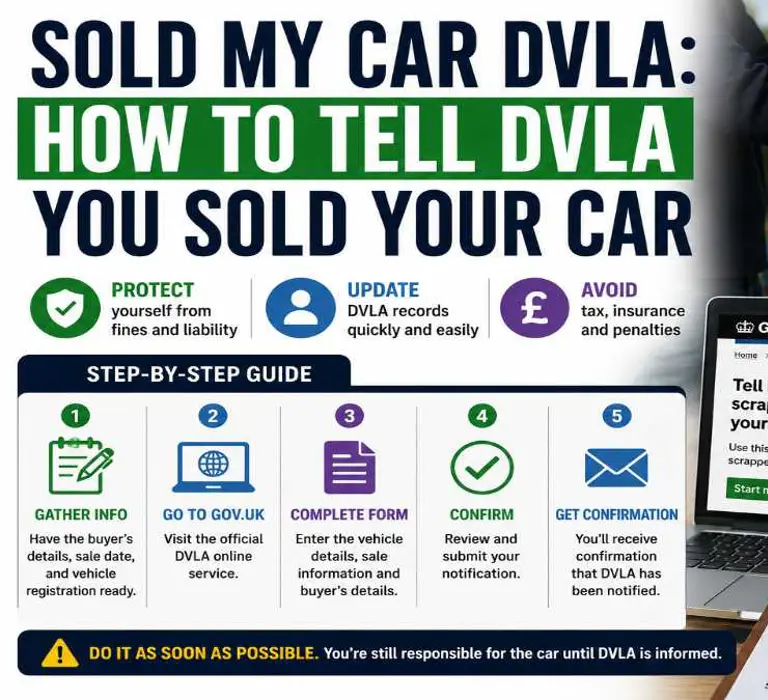
If you have sold your car, telling the DVLA should be done straight away.
Many drivers assume handing over the keys and completing payment finishes the process, but until the DVLA updates its records, the vehicle can still remain legally linked to you.
That can lead to unwanted issues such as parking fines, speeding penalties, congestion charges, tax reminders and other legal notices being sent to your address.
The good news is that updating the DVLA is usually quick and can often be completed online in just a few minutes.
This guide explains exactly how to tell the DVLA you sold your car, what information you need, how long the process takes and what happens if you forget.
I Sold My Car. What Do I Need To Do?
Once ownership changes, there are a few important steps to complete.
|
Step |
What To Do |
|---|---|
|
1 |
Record the buyer’s full details |
|
2 |
Complete the relevant V5C section |
|
3 |
Notify DVLA online or by post |
|
4 |
Save confirmation of transfer |
|
5 |
Check tax cancellation confirmation |
Completing these steps protects you from future liability.
Once the DVLA updates the vehicle record:
-
You are no longer responsible for the vehicle
-
Road tax is cancelled automatically
-
Any eligible refund is processed
-
The new keeper becomes responsible for taxing the vehicle
Looking to Lease your Next Car? Get Exclusive Deals and Offers Today!
I Sold My Car. What Do I Need To Do First?
Once you sell a car, there are a few important steps that protect you from future penalties and ownership issues.
|
Step |
What To Do |
|---|---|
|
1 |
Record the buyer’s full name and address |
|
2 |
Complete the correct V5C section |
|
3 |
Tell DVLA the vehicle has been sold |
|
4 |
Save confirmation of ownership transfer |
|
5 |
Check your road tax cancellation |
Once DVLA updates the vehicle record:
-
You are no longer responsible for the vehicle
-
Vehicle tax is cancelled automatically
-
Any eligible tax refund is processed
-
The new keeper becomes legally responsible for taxing the vehicle
One of the biggest mistakes after selling a car is leaving the ownership update for later.
Until DVLA records change, the vehicle can still remain linked to your name. That can lead to parking notices, speeding penalties or tax reminders being sent to you even after the sale.
Telling DVLA on the same day the vehicle is handed over is usually the safest approach.
Also Read: DVLA Change of Address
Do I Need To Tell DVLA If I Sold My Car?
Yes.
You must notify DVLA every time a vehicle changes keeper.
This applies whether you:
-
Sold the car privately
-
Sold the vehicle to a dealer
-
Used an online car buying company
-
Gave the vehicle to a family member
-
Transferred ownership for any other reason
The DVLA must always know who the registered keeper is.
If you forget to update ownership, the vehicle can remain linked to you on DVLA records.
That can lead to:
-
Parking charge notices
-
Speeding fines
-
Congestion charge penalties
-
Debt recovery letters
-
Tax enforcement notices
How To Tell DVLA You Sold Your Car Online
The fastest method is using the official DVLA online ownership transfer service.
Most online transfers are updated immediately.
What You Need Before Starting
|
Requirement |
Details |
|
Vehicle registration number |
Your number plate |
|
V5C log book |
Including the 11-digit reference number |
|
Buyer details |
Full name and address |
|
Sale date |
Exact ownership transfer date |
Having these details ready helps avoid delays.
Step-By-Step DVLA Online Process
1. Open The Official DVLA Service
Use the GOV.UK vehicle ownership transfer service.
2. Enter Your Vehicle Registration
You will need to confirm the vehicle registration number.
3. Enter The V5C Reference Number
This is the 11-digit number printed on the V5C log book.
4. Add The New Keeper’s Details
Enter the buyer’s:
-
Full name
-
Address
Incorrect details can delay the ownership update.
5. Confirm The Sale Date
Use the exact date the buyer took ownership of the vehicle.
6. Submit The Notification
After submission:
-
DVLA usually updates ownership immediately
-
You should receive confirmation on screen
-
Email confirmation is often sent as proof
-
Vehicle tax is cancelled automatically
Save screenshots or confirmation emails in case issues arise later.
This section directly helps users searching for:
-
tell DVLA sold my car
-
sold my car DVLA online
-
notify DVLA sold car
-
tell DVLA sold car online
-
DVLA notification of sale
How To Tell DVLA You Sold Your Car By Post
If you cannot use the online service, you can notify DVLA by post.
|
Step |
Action |
|
1 |
Complete the V5C new keeper section |
|
2 |
Give the green V5C/2 slip to the buyer |
|
3 |
Post the remaining section to DVLA |
Send it to:
DVLA
Swansea
SA99 1BA
Postal updates usually take up to two weeks.
Online transfer is normally quicker and safer because you receive instant confirmation.
Sold My Car Without A V5C. Can I Still Tell DVLA?
Yes.
If the V5C log book is missing, you can still notify DVLA by writing directly to them.
Include:
-
Vehicle registration number
-
Vehicle make and model
-
Your full name and address
-
Buyer’s full name and address
-
Date of sale
Send the letter to:
DVLA
Swansea
SA99 1BA
Manual processing can take longer without a V5C, so it is worth sending the information as soon as possible.
Drivers who have sold a vehicle without the log book often worry they can no longer notify DVLA properly, but the sale can still be updated using the vehicle and buyer details listed above.
How Do I Know DVLA Has Updated The Sale?
Many drivers worry about whether the ownership transfer actually completed.
After submitting the notification:
-
Online transfers are usually updated immediately
-
DVLA often sends email confirmation
-
Road tax cancellation should appear shortly after
-
Refunds are normally processed automatically
If you do not receive confirmation within a reasonable time:
-
Check spam or junk email folders
-
Contact DVLA directly
-
Keep proof of submission
Do not assume the transfer completed without confirmation.
DVLA Tax Refund After Selling Your Car
Road tax does not transfer to the new keeper when you sell a car.
Once DVLA updates the vehicle record, your existing tax is cancelled automatically and any refund for full unused months is normally issued without needing a separate application.
Most refunds are sent back to the same bank account used for the Direct Debit, although cheque refunds can sometimes be issued instead.
Many drivers only realise this after selling a vehicle and continuing to receive tax reminders or payment notifications.
If you have recently sold your car, telling DVLA quickly helps make sure:
-
The vehicle is no longer linked to your name
-
Future tax payments stop correctly
-
Refund processing starts sooner
-
The new keeper becomes responsible for taxing the vehicle
In most cases, online ownership updates trigger the tax cancellation much faster than postal notifications.
If you continue receiving tax letters after the sale, check whether the ownership transfer was fully completed with DVLA.
Also Check: New Number Plate Dates
What Happens If You Forget To Tell DVLA?
This is where many problems start.
If DVLA records still show you as the registered keeper, you may continue receiving:
-
Parking fines
-
Speeding notices
-
Dart Charge penalties
-
ULEZ or congestion charges
-
Debt collection letters
-
Vehicle tax reminders
In serious cases, unresolved notices can escalate further.
Keeping proof of transfer and notifying DVLA on the same day helps avoid these issues.
Do I Need To Tell DVLA If I Sold To A Dealer?
Yes.
Even if you sell your car to:
-
Main dealers
-
Independent traders
-
Car supermarkets
-
Online buying companies
You should still make sure ownership transfer has been completed correctly.
Some dealers process the transfer with you during handover, but it is still worth checking confirmation before leaving.
Selling A Car And Changing Address
Selling your vehicle does not automatically update your address with DVLA.
If your V5C or driving licence still shows an old address, update it separately.
Incorrect address details can cause delays with:
-
Tax refunds
-
DVLA letters
-
Ownership confirmation
Seller Checklist Before Handing Over The Keys
Use this checklist before completing the sale.
|
Task |
Complete |
|
Buyer details recorded |
□ |
|
V5C completed correctly |
□ |
|
DVLA notified |
□ |
|
Confirmation saved |
□ |
|
Green slip provided |
□ |
|
Vehicle tax checked |
□ |
Keeping a simple written receipt is also recommended.
Replacing Your Car After Selling?
If you are replacing your vehicle after selling, car leasing can reduce some of the admin involved with ownership.
Road tax administration, registration and vehicle paperwork are handled from the beginning, helping simplify the process compared with private ownership.
Sold My Car DVLA FAQs
Use the official DVLA online ownership transfer service or notify DVLA by post.
You should tell DVLA immediately, ideally on the same day the vehicle is handed over.
Yes. Most drivers can complete the process online within a few minutes.
You can still notify DVLA by writing directly with the vehicle and buyer details.
Yes. DVLA automatically refunds full unused months once ownership changes.
You should receive online or email confirmation after DVLA updates the vehicle record.
Yes. Always make sure the ownership transfer has been completed correctly.
You may continue receiving fines, penalty notices and tax reminders until DVLA updates the vehicle record.